


Chargehub EV & Tesla Charging
4.7619.00 Reviews
App Specs
- Version
- Varies with Device
- Updated On
- License
- Free
- Downloads
- 100,000+
- Developer
- Mogile Technologies
- Categories
- Maps & Navigation
- Platform
- Android
Screenshots
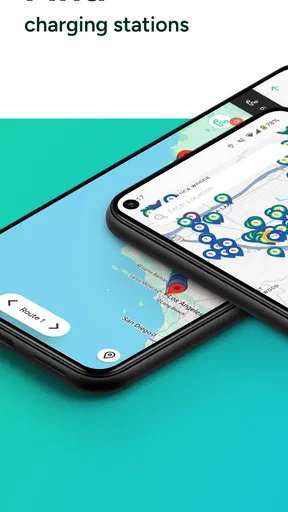
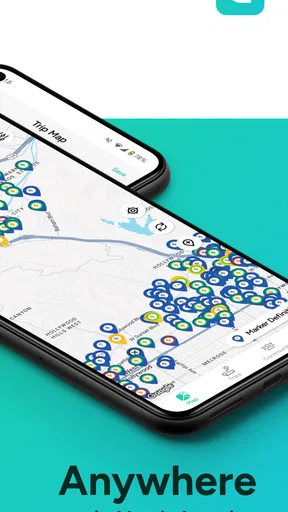
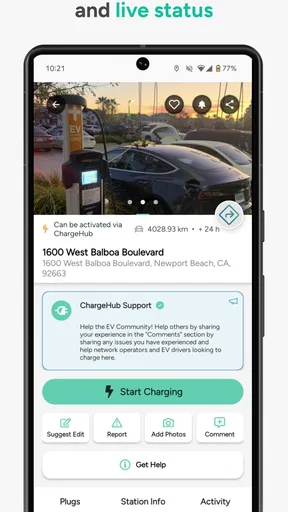
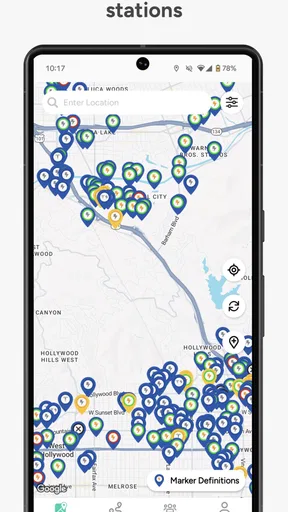
 Analysis by AppCompare
Finding a reliable charging stop is one of those tasks that becomes important only when you are already running low. I tried Chargehub EV & Tesla Charging with that practical problem in mind: not as a general map replacement, but as a dedicated way to look for charging stations while driving an electric vehicle or plug-in hybrid. Its focus is clear, and that focus makes it more useful than a broad navigation app in some situations, although it also means it is not the only travel app I would keep on my phone.
The app comes from Mogile Technologies and sits in the Maps & Navigation category. It is free to download, supports drivers of all EV and PHEV models, and includes Tesla in its coverage. Its store presence is fairly established, with over 100 thousand installs and an average rating of 4.7 from around 8 thousand ratings. That combination suggests a focused utility that many drivers find worthwhile, but I still think the important question is not simply whether it is popular. The real question is whether its charging-station information fits the way you travel.
What the free app gives you before you spend anything
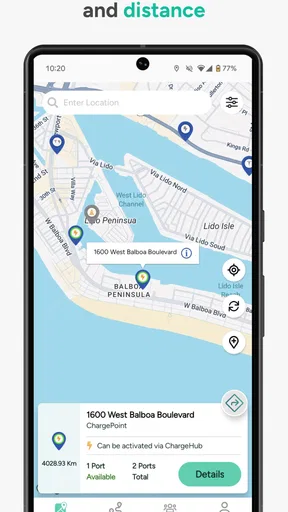
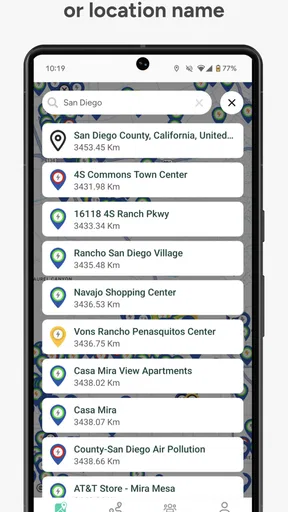
The basic value is easy to understand: Chargehub EV puts charging locations on a map so I can search for a place to recharge instead of relying on memory, roadside signs, or a general map that treats a charger like any other point of interest. That distinction matters when I need to think about the next stop, not just the final destination.
The store lists the app as free, while also showing optional in-app purchases ranging from $3.29 to $29.99 per item. I would therefore approach it as a free starting point rather than assuming every useful capability is included without payment. The free download lets a driver judge whether the station coverage, map presentation, and overall workflow are comfortable before committing to anything extra. That is a sensible way to evaluate it, especially because charging needs vary so much between a daily commuter and someone planning long road trips.
I also appreciate that the app is aimed at all EV and PHEV models rather than being framed around one vehicle brand. A Tesla owner can use it, but so can someone driving another electric car or a plug-in hybrid. That broad scope is more useful in households with different vehicles, when borrowing a car, or when planning a journey in a rental EV whose charging habits are unfamiliar.
The age rating is Everyone, which matches the straightforward nature of the tool. It is a practical navigation utility rather than an entertainment app, and I found the concept easy to explain: open it when charging is part of the trip, locate a suitable station, and use the result alongside the navigation tools I already trust.
How I would use it in an ordinary day
Imagine leaving work with a lower battery than expected and needing to pick up groceries before going home. I would open Chargehub EV before driving away, look for stations near the store or along the route, and compare the options visually rather than waiting until the battery becomes uncomfortable. The useful habit is checking early. A charging map is most valuable when it gives me time to change plans, not when I am already parked outside a station that does not suit my vehicle.
Worth Reading Before You Choose

EA SPORTS FC Mobile 26 Is a Bigger Football Game, but It Takes Time

Flipboard Shows What News Apps Must Do Beyond the Feed

Switching to Android Auto Means Rethinking Your Driving Routine

Google Calendar Makes a Crowded Week Easier to Manage

Ludo King Makes the Most of the Minutes Between Plans

Baby Panda World Brings Quick Play to Modern Phones, but Its Game Library Feels Busy
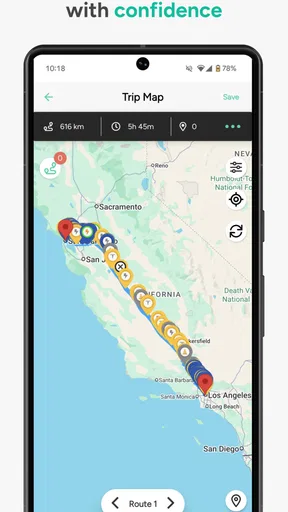
For a longer trip, I would use the app during preparation rather than treating it as my only source of turn-by-turn guidance. I can inspect the charging landscape first, identify possible stops, and then move to my preferred navigation app for the actual drive. This two-step workflow is one of the better ways to use a specialist station map: Chargehub EV handles the charging question, while a conventional navigation app handles the wider route.
There is also a useful social angle to the broad vehicle coverage. If I am helping a friend with a different EV, I do not need to start with a brand-specific application simply to understand where charging opportunities may be. The same map can serve as a shared planning reference, even if the final decision still depends on the car’s connector, charging speed, and the driver’s preferred network.
Why a dedicated charging map can beat a normal map
General mapping apps are excellent for places, roads, traffic, and businesses, but charging is a more specialized search problem. I do not merely need a pin that says “charging station.” I need to think about whether the station is on my route, whether it is convenient for the stop I am making, and whether it makes sense for my particular vehicle. A dedicated EV tool keeps that need at the center of the experience.
The advantage is especially noticeable when I am comparing several possible stops. A normal map can bury charging locations among restaurants, shops, and other points of interest. Chargehub EV is designed around the charging search itself, so it is a more natural first screen when the purpose of opening the phone is specifically to find power.
That does not make it a complete replacement for every alternative. A vehicle manufacturer’s app may be better for car-specific information, while a charging-network app may be more useful when I already know which operator I intend to use. A general navigation app may also be better for traffic-aware routing. My view is that Chargehub EV belongs between those tools: broader than a single-network app, more focused than a general map, and best used as part of a small charging workflow rather than as the entire workflow.
Where the value becomes more practical
The strongest benefit is reducing uncertainty. EV travel is not only about distance; it is about choosing a stop that fits the timing and purpose of the journey. A map dedicated to charging can help me think in terms of options. If one location does not work, I can look for another before I leave, instead of making a rushed decision after the battery warning appears.
That is valuable for apartment residents and drivers who cannot charge at home. Someone with a private driveway may use public charging occasionally, but a person without convenient home access may need to plan around public stations regularly. For that user, a clear station-finding tool can become part of the weekly routine: check options near work, shopping, errands, or overnight stops, then choose the location that causes the least disruption.
PHEV drivers can benefit too, even though their fuel tank provides a fallback. A plug-in hybrid still makes charging more convenient when a station is near a destination, and a dedicated map can help identify opportunities without assuming the driver owns a fully electric vehicle. The app’s inclusive vehicle focus is therefore more than a minor detail; it makes the tool relevant to a wider group of drivers.
I also see value for people who are new to EV travel. Beginners often worry that they must understand every charging network before taking a trip. A broad station map gives them a place to start learning the landscape. It does not remove the need to check compatibility and payment arrangements, but it makes the first planning step less intimidating.
Three habits that make the app more useful
- Search before the battery becomes urgent. I would check for a primary station and a nearby alternative while I still have flexibility. This turns the map into a planning tool instead of an emergency button.
- Separate station discovery from route navigation. I would use Chargehub EV to understand charging choices, then use a navigation app for traffic, road conditions, and detailed directions. Keeping those jobs separate avoids expecting one app to do everything.
- Check the vehicle fit before committing to the stop. The app covers EVs and PHEVs, including Tesla, but broad coverage does not mean every individual station is equally suitable for every car. I would confirm the connector, access conditions, and charging expectations before making the detour.
These habits also reveal an important trade-off. The app can help me find a station, but finding a station is not identical to guaranteeing a smooth charging session. A map is an information layer. The actual experience can still depend on the site, the connector, the operator, the vehicle, and the conditions when I arrive. I would never treat a single map result as permission to ignore those practical checks.
What the optional spending means for value
Because the app is free with in-app purchases, I judge its value in two stages. First, the free access has to save me time and reduce charging anxiety. If I only need an occasional station search, that may already be enough. I would not pay simply because the app is dedicated to EVs; I would pay only if an optional feature clearly improves a repeated part of my own routine.
The listed purchase range runs from $3.29 to $29.99 per item. Those amounts cover a wide enough span that I would inspect each purchase carefully before confirming it, especially if I am a casual user. A frequent road-tripper may see more value in advanced convenience, while a driver who charges mostly at home may have little reason to spend beyond the free experience.
I like that the decision can be made after trying the app rather than before downloading it. The free entry point lets me test whether the map feels useful in the places I actually drive. That is more meaningful than judging the app from its category alone. A charging map can be excellent in one driver’s routine and unnecessary in another’s, depending on home charging, local station density, and travel habits.
The friction I would consider before relying on it
The first limitation is that a station map does not automatically solve availability. If I am driving a long distance, I would still want a backup plan. A location appearing on a map does not remove the possibility of a busy station, an unsuitable connector, restricted access, or a stop that is inconvenient at the time I need it. The app helps with discovery, but it should not encourage overconfidence.
The second limitation is that the broad vehicle promise can make the app feel less tailored than a manufacturer’s companion app. Tesla drivers, for example, may prefer their vehicle’s own tools for information closely tied to the car. Drivers who regularly use one charging network may also prefer that network’s app for account actions and operator-specific details. Chargehub EV is more attractive when I want a wider view rather than a single-brand or single-network experience.
There is also a planning burden that remains with the user. I still need to know my vehicle’s connector and charging preferences, estimate how much time I can spare, and decide whether a detour is worthwhile. The app can shorten the search, but it cannot make those decisions for me. That is not a flaw unique to this product, yet it is important for first-time EV owners who may expect a charging map to behave like a complete travel assistant.
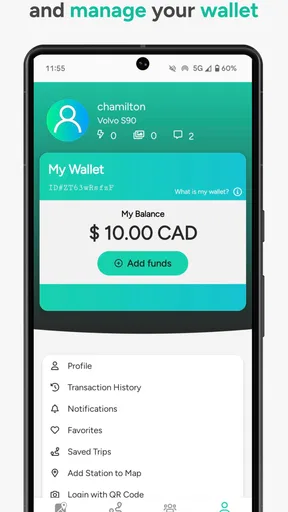
The optional purchase model is another point to watch. Free access is appealing, but I would resist buying anything until I understand exactly what changes after payment and whether that change matters to me. For occasional use, the free experience may provide all the value needed. For heavy use, a paid option could be reasonable, but only when it removes a real frustration rather than adding a feature I rarely open.
Finally, I would keep a second navigation option available. Chargehub EV is specialized around charging stations, while normal navigation tools remain better suited to traffic, road closures, arrival times, and the complete journey. I see this as a complementary app, not a universal replacement. That distinction makes the product easier to use well and prevents disappointment caused by expecting one map to cover every travel need.
Who will get the most from it?
I would recommend it most strongly to EV and PHEV drivers who use public charging, take unfamiliar routes, or want a quick way to survey charging possibilities before setting off. It is particularly sensible for people who do not want to be locked into one vehicle brand or charging operator. The all-model approach makes it a flexible reference tool for mixed households and shared travel planning.
It is also a good fit for a new EV owner who wants a dedicated place to begin. Rather than searching a general map repeatedly, the driver can build a habit around a charging-focused app and learn which locations make sense for regular errands. The free download lowers the risk of trying it, and the Everyone rating makes it suitable as a straightforward household utility.
I would be less enthusiastic for someone who charges almost exclusively at home and rarely travels beyond familiar areas. That driver may open the app so infrequently that a general map or the car’s built-in tools are enough. I would also suggest looking elsewhere first if the main need is traffic-aware route guidance, detailed vehicle telemetry, or managing one specific charging network.
For frequent road trips, I would use it as one part of a deliberate system. I would identify charging possibilities here, verify the stop using the vehicle or network tools available to me, and navigate with the app that gives the best route information. That layered approach is more reliable than asking Chargehub EV to replace every other driving tool.
My buy-or-skip verdict
My verdict is to try the free version first. Chargehub EV has a clear purpose, supports both EV and PHEV drivers, includes Tesla, and offers a more focused charging view than a normal map. Its best quality is not flashy complexity; it is the simple reduction of effort when I need to find charging options before a trip or during an unfamiliar drive.
I would consider an in-app purchase only after using the free experience enough to identify a specific need. The listed prices range from $3.29 to $29.99 per item, so the right choice depends on how often I rely on public charging and whether the paid benefit improves that routine. Free access is the sensible choice for occasional drivers, while regular travelers can evaluate paid value based on repeated convenience rather than assumption.
After years of app stores filling up with broad tools that try to handle everything, I find the focused approach refreshing. It is not a substitute for my car’s own information, a network’s account tools, or a full navigation app. It is a specialist map that earns its place when charging is the specific problem I am trying to solve.
My recommendation: install it if you drive an EV or PHEV and want a broad charging-station reference, especially if you travel outside familiar areas. Skip it if public charging is almost irrelevant to your routine or if you need a single app to manage navigation, vehicle data, and charging payments all at once. For the right driver, Chargehub EV & Tesla Charging is a useful free starting point, with optional spending best treated as a personal convenience decision rather than a requirement.
Pros
- Covers many public EV charging networks in one app.
- Useful filters help find compatible chargers and amenities.
- Shows connector types
- pricing details
- and station availability.
- Trip planning can help estimate charging stops along a route.
- User reports can highlight broken chargers or access issues.
Cons
- Station data may be outdated when users do not report changes.
- Some chargers require a separate network app or account to start.
- Pricing information is not always available for every location.
- The map can feel crowded in areas with many charging stations.
- Live availability may vary depending on network data accuracy.
FAQs for Chargehub EV & Tesla Charging
What is Chargehub EV & Tesla Charging used for?
Chargehub EV & Tesla Charging is designed to help electric-vehicle drivers find public charging stations, check connector compatibility, view station details, and plan charging stops. The app can be useful for everyday commuting as well as longer road trips, since it brings charging-location information into one interface instead of requiring drivers to search through several separate charging-network apps.
Can I use Chargehub EV & Tesla Charging to find Tesla Superchargers?
Yes, the app includes tools for locating Tesla charging options, including Supercharger locations where applicable. However, availability and access can depend on the vehicle model, connector type, regional compatibility, and Tesla’s current policies. Before driving to a charger, it is sensible to review the station details in the app and confirm that the location supports your specific Tesla or EV.
Does the app show whether a charging station is available?
Chargehub EV & Tesla Charging may display station status and other useful information, such as reported availability, charging-network details, connector types, pricing information, and user comments. This data can change quickly because stations may become occupied, unavailable, or temporarily offline. Treat the displayed status as helpful guidance rather than a guaranteed reservation or real-time promise.
Can I pay for charging directly through Chargehub EV & Tesla Charging?
Payment features depend on the charging network, station operator, location, and the options supported in your region. In some cases, the app may direct you to a network’s own application, website, or payment method instead of processing the entire session itself. Check the station’s listed instructions before arriving, particularly if you are traveling and do not already have an account with that operator.
Is Chargehub EV & Tesla Charging free to download and suitable for every electric vehicle?
The app can generally be downloaded without an upfront charge, although certain features, services, or charging sessions may involve separate costs set by the station operator or network. It is intended for EV drivers, but the usefulness of each listing depends on your vehicle’s connector, charging speed, and regional support. Always verify compatibility before beginning a trip or relying on a specific station.


